

Appearance
Access Control
Every deployment on NextEpoch has platform-level access control — authentication is handled by the infrastructure before traffic reaches your app. No login pages to build, no token middleware to maintain.
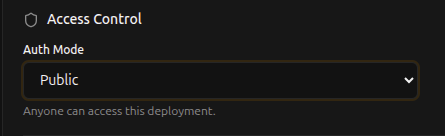
Auth Modes
Choose an auth mode when deploying or updating a deployment:
Public
Anyone can access the deployment. Use this for marketing sites, blogs, public APIs, and open-source demos.
Token (Bearer)
API clients must present a Bearer token in the Authorization header. Returns 401 on failure. Use this for backend APIs, webhooks, and service-to-service communication.

Browser (SSO)
Users authenticate via the platform's single sign-on. A session cookie is set automatically after login. Use this for internal tools, admin panels, and team-facing apps.

Minimum Role
When using Token or Browser mode, you can set a minimum role requirement to restrict who can access the deployment:
| Role | Access level |
|---|---|
| Any authenticated user | Default — anyone with a valid token or session |
| Viewer | Read-only members and above |
| User | Standard members and above |
| Contributor | Contributors and above |
| Admin | Admins and above |
| Owner | Owners only |
How It Works
Access control is enforced by the platform before traffic reaches your deployment. When a request arrives:
- The platform checks the auth mode configured for the deployment
- For Public mode, the request passes through
- For Token mode, the platform validates the Bearer token and checks the user's role
- For Browser mode, the platform checks for a valid session cookie. If none exists, the user is redirected to SSO login
Your app never sees unauthenticated traffic (in Token or Browser mode). It receives the request only after the platform has verified the user.
Changing Access Control
You can change the auth mode and minimum role at any time:
- Navigate to Apps > Deployed > your deployment
- Update the Access Control section
- Click Save Changes
Changes take effect immediately.