

Appearance
Security Scanning
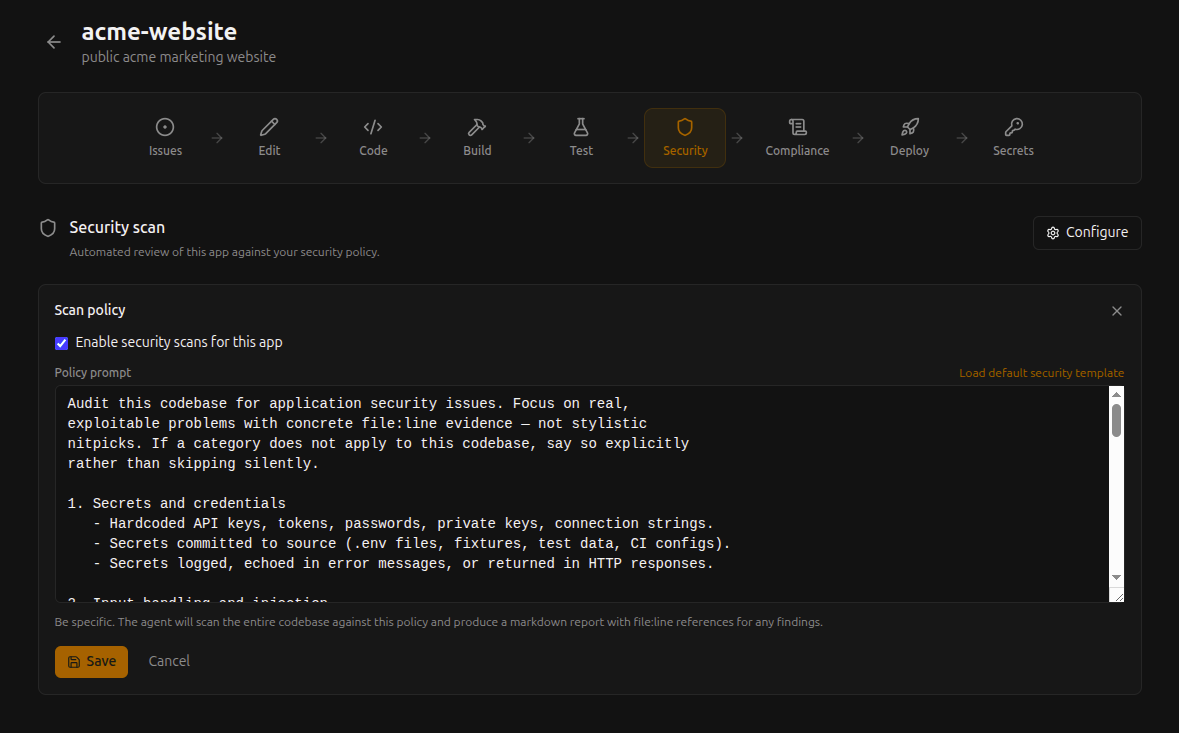
Every commit on NextEpoch is automatically scanned against your configurable security policy. The scanner focuses on real, exploitable problems and reports findings with exact file and line references.
How It Works
When code is pushed or a pull request is created, the platform runs an automated security scan as part of the pipeline. The scan analyzes your code for:
- Hardcoded secrets — API keys, passwords, tokens committed to source
- Injection vulnerabilities — SQL injection, command injection, XSS
- Authentication bugs — Broken auth flows, session mismanagement
- Dependency vulnerabilities — Known CVEs in your dependencies
Configuring the Policy
Each app has a configurable security policy that controls what the scanner looks for and how strictly it reports. Navigate to your app's security settings to customize the policy prompt.
The policy is flexible — you can:
- Focus on specific vulnerability categories
- Adjust severity thresholds
- Add context about your app's architecture so the scanner understands what's intentional vs. risky
Reading Scan Results
Scan results appear in the pipeline view for each commit. Each finding includes:
- Severity — How critical the issue is
- Category — The type of vulnerability
- File and line — Exact location in your code
- Description — What the issue is and why it matters
- Recommendation — How to fix it
No Setup Required
Security scanning runs automatically — there's nothing to install, no configuration files to add to your repo, and no external service to connect. It's part of the pipeline from the start.